Configure Charges for Maintenance Services Performed to Owned Units
Stay is enhanced to allow users to configure charges for the maintenance services performed to the owned units at the property.
Feature Setting
-
Name: Work Order Fees for Maintenance Requests
-
Value: Must be enabled
-
Comments: License is not required
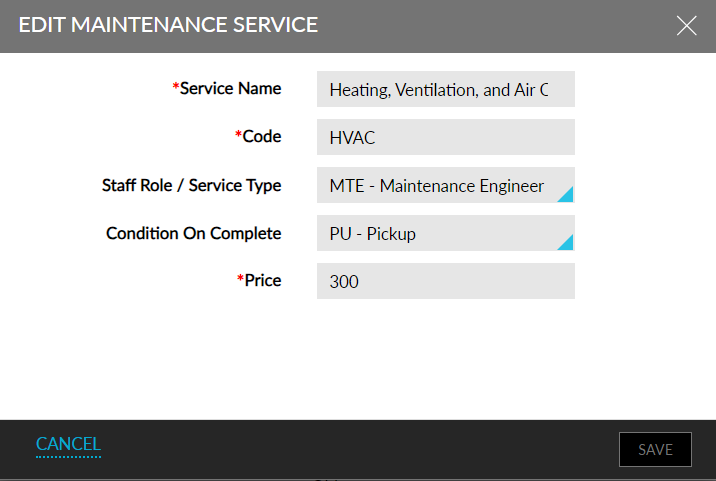
When the new feature setting is enabled, users can configure the charges for the maintenance services on the Add/Edit Maintenance Service screen (Rooms Mgmt ➜ Maintenance ➜ Setup ➜ Services).
The Price column on the Service Types section displays the charge configured for the services. When users raise a new maintenance service request, the charge configured for the selected service is displayed in the Price field on the Request Service screen. Users can modify the price if required. Users can enter the comments in the Notes field. Users can enable the Charge Service to Unit Owner checkbox to post charges of the maintenance services to the owner of the unit.
To support this enhancement the following changes have been made:
-
A new field, Price, has been added to the Add/Edit Maintenance Service screen (Rooms Mgmt ➜ Maintenance ➜ Setup ➜ Services) that allows users to configure the price for the maintenance charges.
-
A new column, Price, has been added to the Service Types section of the Maintenance Setup screen that displays the price configured for the services.
-
A new field, Price, has been added to the Request Service screen that allows users to view/modify the price for the selected service.
-
A new field, Notes, has been added to the Request Service screen that allows users to enter the comments for the price.
-
A new checkbox, Charge Service to Unit Owner, has been added to the Request Service screen that allows users to post charges to the owner of the unit for which the maintenance service is performed.
-
This checkbox is enabled for selection only if an owned unit is selected in the Request Service screen.
-
-
Two new columns, Price, and, Notes, have been added to the Room MT Service Requests section of the Maintenance screen that displays the price and notes configured for the services. Users can modify these details from this section if required.
-
Two new columns, Price, and, Notes, have been added to the General Area MT Service Requests section of the Maintenance screen that displays the price and notes configured for the services.
-
Two new columns, Price, and, Notes, have been added to the Unassigned Service Requests section (Rooms and General Areas tabs) on the Assign tab of the Maintenance screen that displays the price and notes configured for the services.
-
Two new columns, Price, and, Notes, have been added to the Assigned Service Requests section on the Assign tab of the Maintenance screen that displays the price and notes configured for the services.